Inbox and export
Read, filter and flag submissions, then export everything to CSV. Your data stays yours.
Reading submissions
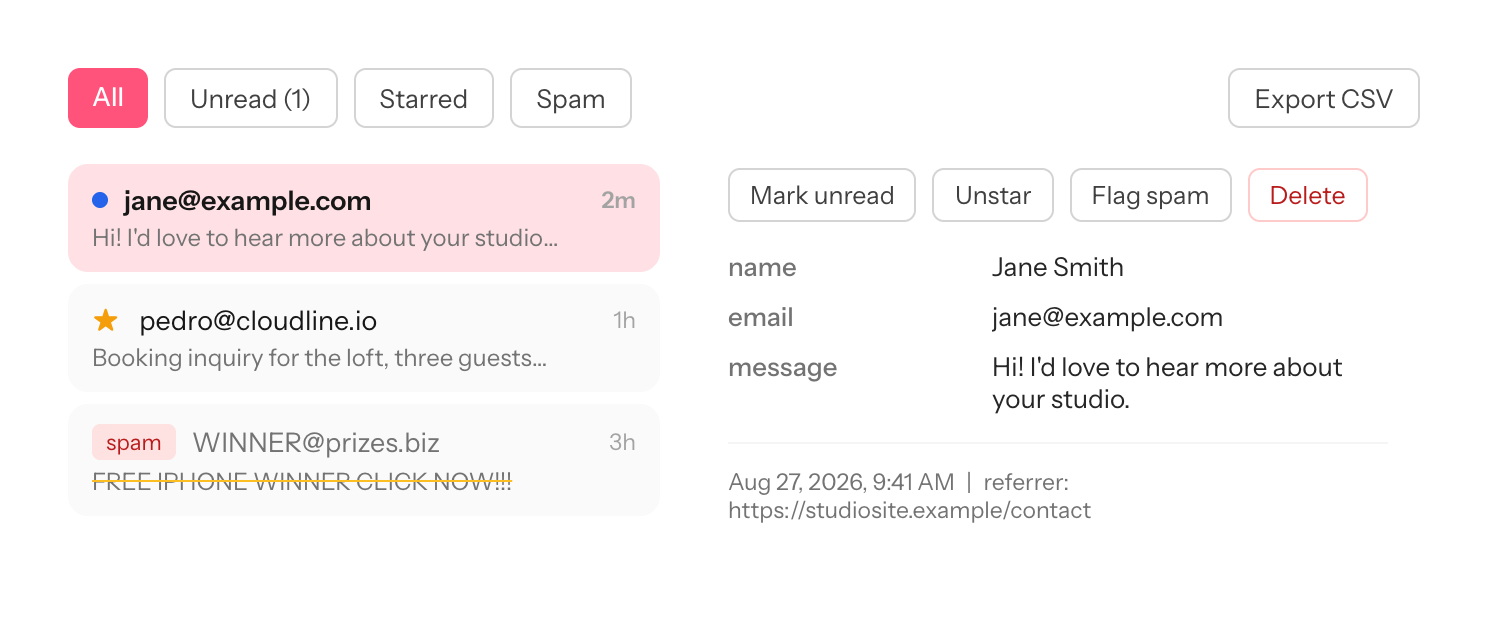
Each form has an inbox. Every row shows a preview, the submitter's values, the referrer and the time. Click a submission to see the full payload with metadata.
Filters and flags
Filter by All, Unread, Starred or Spam. Flag individual submissions as read, starred or spam from the inbox or the submission view.
Spam
Nisuform scores submissions with a honeypot check and fill-time heuristics. Detected spam is dropped at the endpoint and never reaches your inbox. Blocked attempts are counted in your stats as spam blocked, so you can see the filtering working.
Email notifications
Enable notifications per form to receive each submission by email with your subject template. See Managing forms.
CSV export
Export any form to CSV from the inbox. The export includes every field, the metadata and the flags. CSV export is free on every plan, including the full history: Nisuform never holds your data hostage.