How to Handle HTML Forms Without a Backend
An HTML form needs a URL that accepts its POST request. Here are four ways to get one on a static site, with working code, spam protection and a checklist.
Nisuform team
6 min read
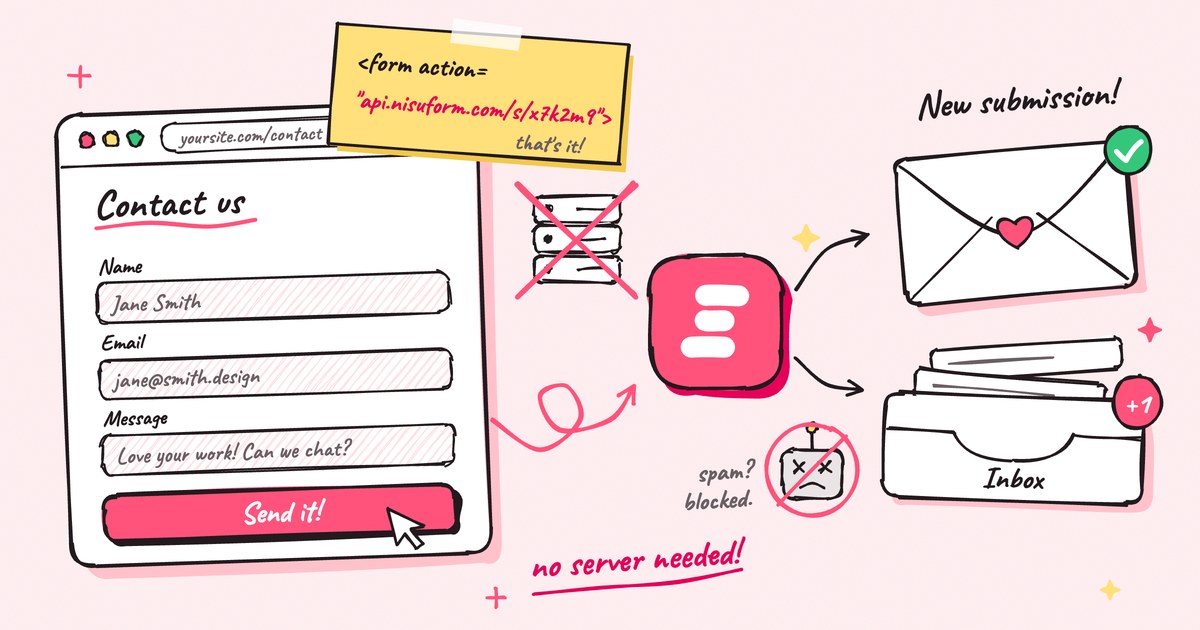
Short answer: set your form's action to a form backend endpoint and its method to POST. The service receives each submission, filters spam, stores it and emails you. There is no server code to write or host, and the form works without JavaScript.
<form action="https://api.nisuform.com/s/YOUR_FORM_KEY" method="POST">
  <label for="email">Email</label>
  <input id="email" type="email" name="email" required>

  <label for="message">Message</label>
  <textarea id="message" name="message" required></textarea>

  <input type="text" name="_gotcha" tabindex="-1" autocomplete="off" style="display:none">
  <button type="submit">Send</button>
</form>
With Nisuform, that is the whole setup. The rest of this guide explains what happens when a form is submitted, compares the four common ways to handle it, and covers spam, validation and what visitors see afterwards.
Why does an HTML form need a backend?
When someone presses submit, the browser collects every field that has a name and sends them to the URL in the form's action, usually as a POST request. Something at that URL has to accept the request and do something useful with it.
A static host like GitHub Pages, Netlify, Vercel or Cloudflare Pages is built to serve files. Unless you add something, nothing on it is listening for your form's POST, so the submission goes nowhere.
Whatever receives the submission also has to:
- check the fields and reject anything malformed
- filter out bots and spam
- store the submission, so nothing is lost if an email bounces
- tell you about it, usually by email
- show the visitor a thank-you page
That list is the backend. The only question is who runs it.
Four ways to handle a form without your own server
| Approach | Setup time | Spam protection | Where submissions go | Upkeep |
|---|---|---|---|---|
mailto: action | Seconds | None | The visitor's email app | None, but many submissions never arrive |
| Embedded form builder | Minutes | Built in | The builder's dashboard | Low, but it is their form, not yours |
| Your own serverless function | Hours to days | Whatever you build | Wherever your code sends them | You own the code, email setup and spam rules |
| Form backend service | Minutes | Built in | Inbox, email and webhooks | None |
1. A mailto: action
<form action="mailto:you@example.com"> looks like the easy way out. On submit, the browser tries to open the visitor's email app with the answers pasted into a new message. Visitors who only use webmail, or who are on a shared computer, get an error or nothing at all. You never find out the message was lost, and your address sits in the page source for scrapers to collect.
2. An embedded form builder
Google Forms, Typeform and Tally host the entire form. You paste an embed code or share a link, and they take care of submissions. It is quick, but the form is theirs: it looks like their product, loads their scripts, and ignores your own markup and CSS.
3. A serverless function you write yourself
Most hosts can run small functions, so you can write the backend yourself. A minimal Cloudflare Worker that accepts the form looks like this:
export default {
  async fetch(request) {
    if (request.method !== 'POST') {
      return new Response('Method not allowed', { status: 405 })
    }
    const data = Object.fromEntries(await request.formData())
    await sendEmail(data)
    return Response.redirect('https://example.com/thanks', 303)
  },
}
The function is short. Everything around it is not. sendEmail needs an email provider, a verified sending domain and SPF and DKIM records. You still have to add spam filtering and rate limits, keep submissions somewhere when an email fails, handle CORS for fetch requests and build a way to read old submissions. That is worth it when forms are core to your product. For a contact form, it is a lot of code to own.
4. A form backend service
A form backend gives you a URL that already does all of the above. You keep your own HTML and CSS and change one attribute. Nisuform is a form backend, and the examples below use it, but the same ideas apply to any service you pick.
Set up a form backend in four steps
Create a form and copy its endpoint
Sign in at app.nisuform.com and choose Create a form. Pick Endpoint only if your site already has a form. The endpoint is on the form's Setup tab and looks like
https://api.nisuform.com/s/YOUR_FORM_KEY.Point your form at it
Set the form's
actionto your endpoint and itsmethodtoPOST. Give every input aname, because the browser only sends fields that have one. The name is also the label you see in your inbox.contact.html <form action="https://api.nisuform.com/s/YOUR_FORM_KEY" method="POST"> <label for="name">Name</label> <input id="name" type="text" name="name" required> <label for="email">Email</label> <input id="email" type="email" name="email" required> <label for="message">Message</label> <textarea id="message" name="message" rows="5" required></textarea> <input type="text" name="_gotcha" tabindex="-1" autocomplete="off" style="display:none"> <button type="submit">Send</button> </form>Keep the honeypot field
The hidden
_gotchainput is a trap for bots. People never see it, so they leave it empty, while many bots fill in every field they find. Submissions with a value in it are dropped. Hide it with CSS as shown, not withtype="hidden", because bots skip hidden inputs.Send a real test
Open your live site, fill in the form and press submit. You land on a thank-you page with a link back to your site, the submission appears in your inbox, and a notification email arrives within seconds.
Keep visitors on the page with fetch
A plain form takes the visitor to a thank-you page after submit. To stay on your page and show your own message, send the form with fetch and ask for JSON:
const form = document.querySelector('form')
const status = document.querySelector('#status')
const shownAt = Date.now()

form.addEventListener('submit', async (event) => {
  event.preventDefault()
  const data = new FormData(form)
  data.set('_elapsed', String(Date.now() - shownAt))

  const response = await fetch(form.action, {
    method: 'POST',
    headers: { Accept: 'application/json' },
    body: data,
  })
  const result = await response.json()

  status.textContent = result.ok ? 'Thanks! We got your message.' : result.message
  if (result.ok) form.reset()
})
Add an empty <p id="status" role="status"></p> below the form so screen readers announce the result.
Three details make this script better than most:
- The form keeps its
actionandmethod, so it still works if the script fails to load. _elapsedtells Nisuform how long the visitor spent on the form. Anything under 2 seconds is treated as a bot and dropped.- Error responses include a
messagewritten for people, like "Too many requests. Try again shortly", so you can show it as is.
Stop spam without a CAPTCHA
Every public form finds bots eventually. Stack cheap, invisible checks before you make people solve a puzzle:
- Honeypot. The hidden
_gotchafield from step 3. - Fill time. The
_elapsedvalue from the script above. A person needs a few seconds, a bot a few milliseconds. - Allowed websites. List your domains in the form's settings, and posts from any other site are rejected.
- Rate limits and link checks. Floods from one visitor are rejected, and submissions stuffed with links go to a spam folder instead of your inbox.
- Cloudflare Turnstile. For a form that still gets hit, add a Turnstile widget. Most visitors never see a challenge.
Bots caught by the honeypot or the fill-time check still get a normal success response, so they can't tell what gave them away. How spam filtering works lists every check in the order it runs.
Checklist before you ship
- Every field has a unique
name, except checkboxes that belong to one group. - Every field has a
<label>, so the form works with screen readers and tapping a label focuses its field. - Email fields use
type="email"and required fields userequired, so the browser catches mistakes before sending. - The form uses
method="POST". AGETform puts every answer in the URL. - The honeypot is hidden with CSS, not with
type="hidden". - You sent a test from the live site. If you set allowed websites, add
http://localhost:3000, or whatever your dev server uses, to test locally. - You know where visitors land after submit. On Pro, you can redirect them to your own thank-you page.
The takeaway
A static site doesn't need a server to take form submissions. It needs a URL that accepts them. Point your form's action at a form backend, keep the honeypot, and spend the time you saved on the site itself. When you're ready to go further, the HTML forms guide covers file uploads, hidden fields and every limit.
Frequently asked questions
Can an HTML form send an email without a backend?
Not on its own. A form can only send its fields to a URL. With a mailto action, the browser opens the visitor's email app instead of sending anything, and many visitors have none set up. To get an email for every submission, point the form at a service that receives the request and sends the email for you.
Is it safe to put a form endpoint in public HTML?
Yes. The endpoint only accepts new submissions, and nobody can read your submissions through it. They are only visible in your dashboard. To stop other sites from posting to it, add your domains to the form's allowed websites, and rotate the key if it is ever abused.
Does this work on GitHub Pages, Netlify, Vercel and Cloudflare Pages?
Yes. The form posts straight to the form backend, so it works on any host that serves HTML, including GitHub Pages, Netlify, Vercel, Cloudflare Pages and Amazon S3, and on site builders like Webflow and Framer.
Do I need JavaScript to handle a form without a backend?
No. A form with an action URL and method POST works in every browser, even with JavaScript turned off. You only need JavaScript to keep visitors on the page and show your own success message.
How much does a form backend cost?
Nisuform's Free plan includes 3 forms and 100 submissions a month with spam filtering, email notifications and CSV export, and needs no credit card. Pro is $10 a month for 5,000 submissions, unlimited forms, file uploads and webhooks.